


TextsBert is Featured on the Chrome Web Store.
Browser form filling extension for Chrome, Edge, Opera, and Firefox.
TextsBert works inside your browser to help fill forms from copied text, emails, notes, invoices, and saved business details. It keeps review visible before submit and processes the fill path locally on your device.
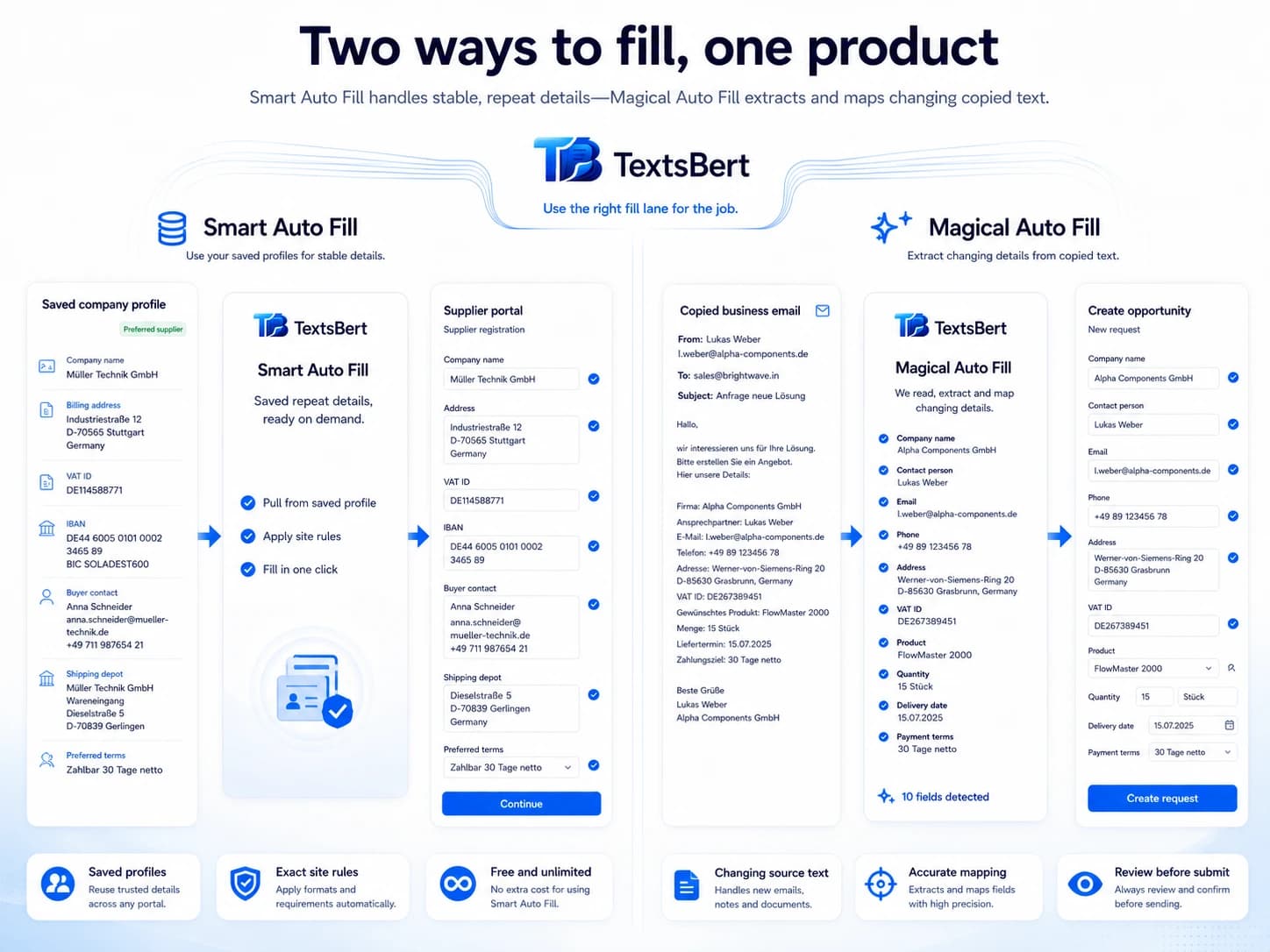
Use Smart Auto Fill for repetitive information and saved details. Use Magical Auto Fill when the incoming copied text changes every time.
Which browsers does TextsBert support?
TextsBert works as a browser form filling extension for Chrome, Edge, Opera, Firefox, and Chromium-based browsers. It helps autofill forms from copied text and saved business details while keeping review before submit, PDF Auto Fill workflows, and local processing clear.
TextsBert works as a browser form filling extension for Chrome, Edge, Opera, Firefox, and Chromium-based browsers. It helps autofill forms from copied text and saved business details while keeping review before submit, PDF Auto Fill workflows, and local processing clear.
Two core ways to fill, plus the support layers around them.
TextsBert stays lighter when repetitive information and changing copied text do not have to pretend they are the same job.
Smart Auto Fill
For saved form details and repetitive information you reuse often.
- Saved records for names, addresses, billing details, company data, and repeated form fields
- Site rules, exact URLs, and local files
- A serious upgrade over native browser autofill
Magical Auto Fill
For copied text that arrives differently from case to case.
- Built for emails, notes, portal text, and other messy input
- Magical Key for fast clipboard-driven fills
- Review stays visible before the final submit
Profiles and Snippets
For repetitive information, text expansion, approved wording, and lighter follow-up work.
- Keep repetitive personal and company details close to the next form
- Snippets work as text expansion for saved replies and repeated form text
- Both core fill modes get easier over time
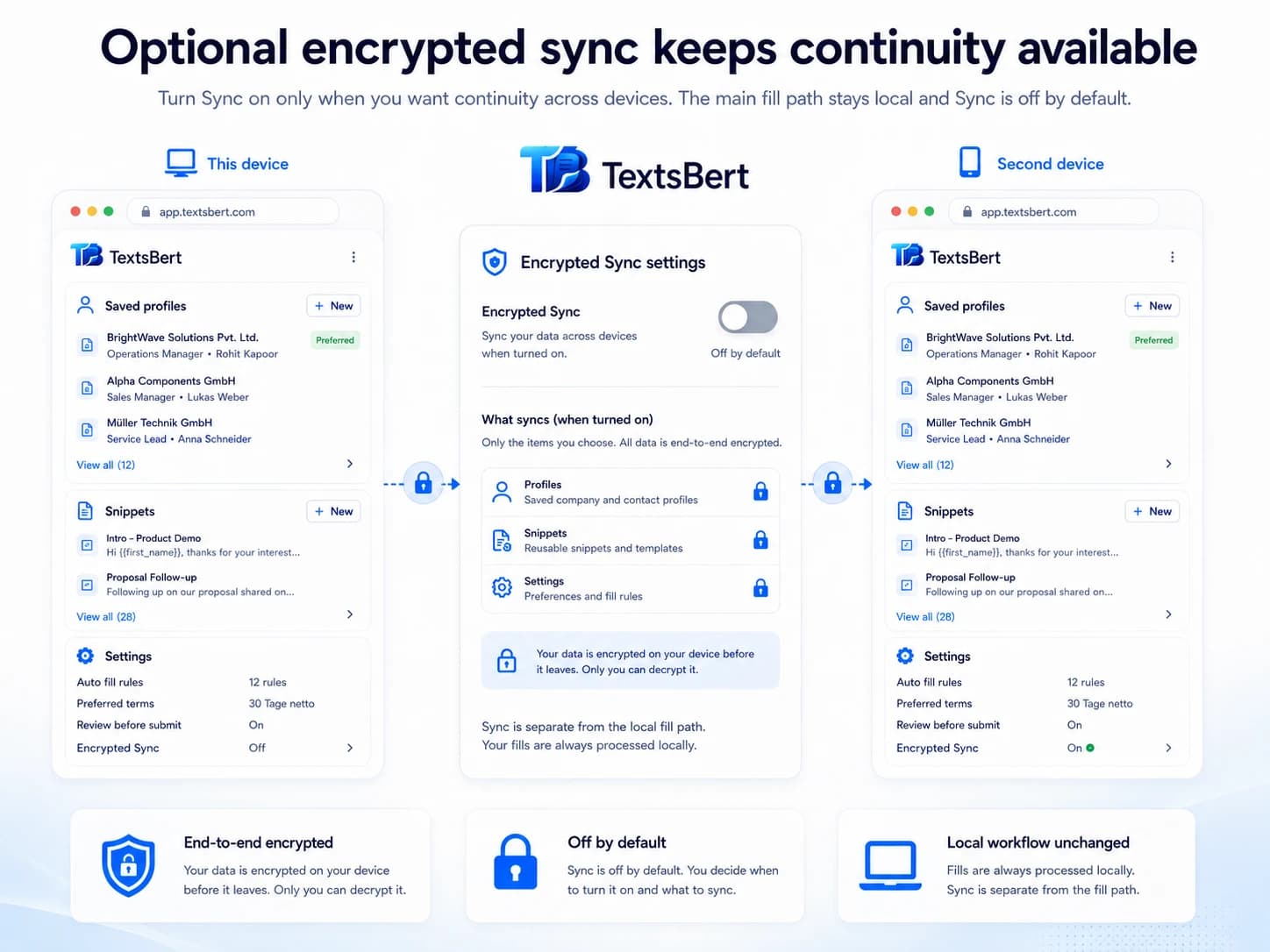
Keep saved autofill local. Add continuity only if you want it.
Manage records, labels, and website scope locally on your device. Optional Sync is end-to-end encrypted, account-backed, and off by default.
- No cloud AI for the data you handle
- Smart Auto Fill imports stay local to the extension
- Saved labels and website scope stay explicit
- Sync supports continuity without becoming the main workflow
In many countries, copied customer data should not leave the workflow just to be processed by outside cloud AI. TextsBert keeps the core workflow on the user's own machine.
Sources:European CommissionEDPB Guidelines 05/2021ICO international transfers
Manage records, labels, and website scope locally on your device. Optional Sync is end-to-end encrypted, account-backed, and off by default.
PDF Auto Fill stays in the same TextsBert flow.
PRO includes PDF Auto Fill for fillable PDFs with visible review before export.
- PDF Auto Fill for fillable PDFs
- Visible review before export
- Useful when the browser task becomes a document
- PDF Auto Fill stays focused on fillable PDFs
- Useful when form work ends in a document
- Still part of the same review-first workflow
Install the form filling extension where the work actually happens.
TextsBert is built for repetitive browser form filling that still changes from case to case and still needs review before submit.

