


TextsBert is Featured on the Chrome Web Store.
Form filling for browser forms, copied text, and saved business details.
TextsBert is a form filling extension for real browser work. It helps you fill web forms from copied emails, clipboard text, invoices, notes, customer messages, and saved business details, while keeping review visible before you submit.


Smart Auto Fill covers repetitive information and saved form details. Magical Auto Fill covers copied text that changes from case to case.
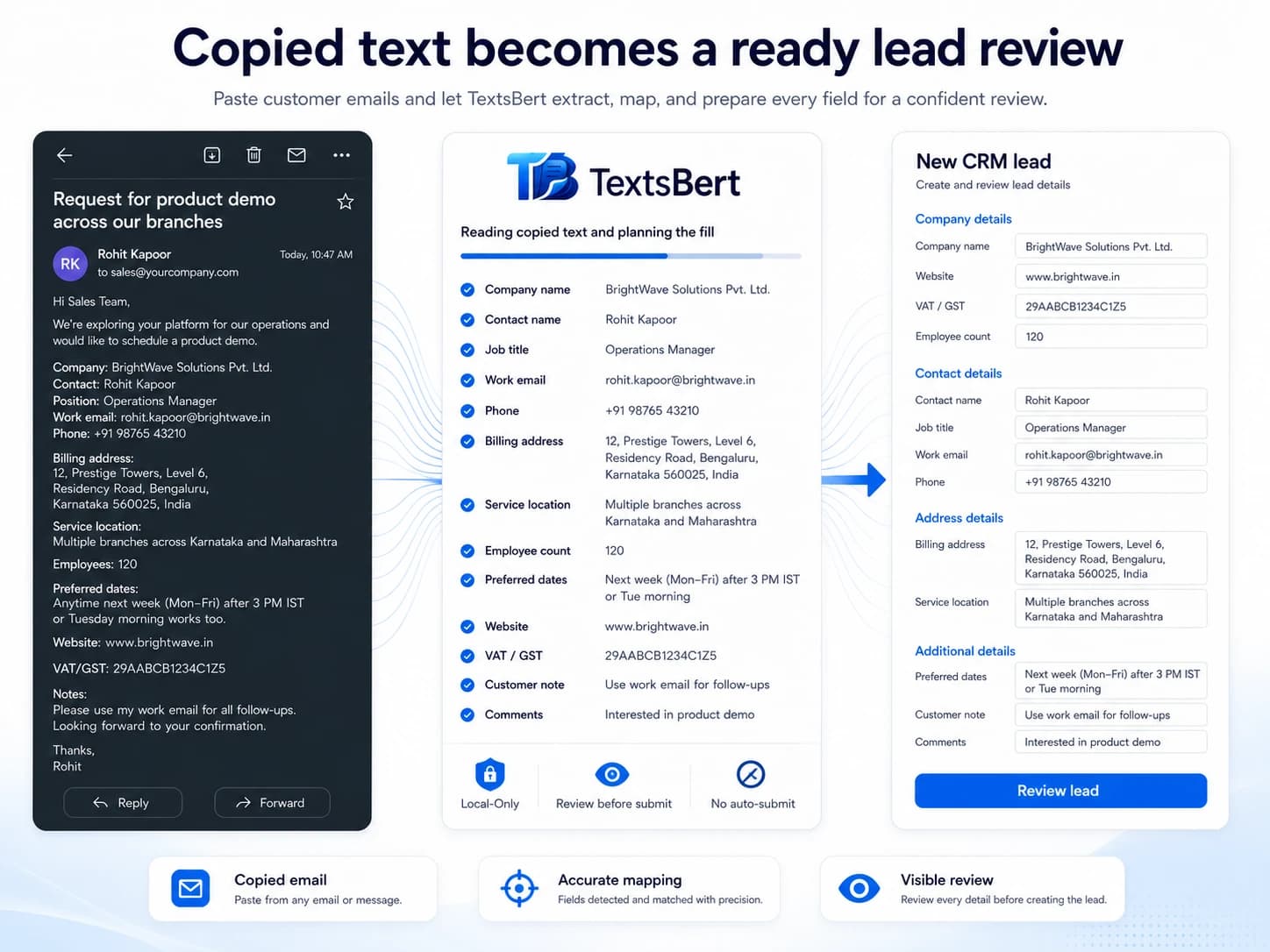
What is TextsBert for form filling?
TextsBert is a form filling extension and browser form filler for Chrome, Edge, Opera, Firefox, and Chromium-based browsers. It helps fill web forms from copied text, clipboard content, customer emails, saved business details, and repetitive information. Use it to auto fill forms with review visible before submit, not to submit blindly.
TextsBert is a form filling extension and browser form filler for Chrome, Edge, Opera, Firefox, and Chromium-based browsers. It helps fill web forms from copied text, clipboard content, customer emails, saved business details, and repetitive information. Use it to auto fill forms with review visible before submit, not to submit blindly.
For browser form filling that still needs to be right.
Smart Auto Fill covers repetitive information and saved form details. Magical Auto Fill covers copied text that changes from case to case.
Smart Auto Fill for saved form details
Keep names, addresses, billing details, company records, and other repetitive information ready for the browser forms that keep coming back.
- Free and unlimited
- A serious upgrade over native browser autofill
- Supports exact URL rules, saved form details, local file pages, and manual import
Magical Auto Fill for copied text that changes every time
Start from copied emails, notes, invoices, chats, or portal text when every case arrives in a slightly different shape.
- Built for messy real-world input
- Magical Key shortcut gives a fast clipboard-driven start
- Review stays visible before the final submit
Private form filling for sensitive browser work.
TextsBert keeps the form filling path local on your device instead of sending copied text, visible form content, or filled values through cloud AI services. Review stays visible before the final submit.
- No cloud AI for the data you handle.
- Final action stays with the user.
- Imported Smart Auto Fill data stays local to the extension.
- Optional Sync is end-to-end encrypted and off by default.
In many countries, copied customer data should not leave the workflow just to be processed by outside cloud AI. TextsBert keeps the core workflow on the user's own machine.
Sources:European CommissionEDPB Guidelines 05/2021ICO international transfers
Made for repetitive form filling that still has to be right.
TextsBert is especially useful in vendor onboarding, billing, shipping, admin portals, customer forms, and other browser tasks where the form repeats but the incoming details change.
Vendor onboarding and registrations
Move faster through supplier forms, partner signups, procurement portals, and company registration flows.
- Profiles keep business identities ready
- Snippets add text expansion for repeated wording
- Field behavior can be carried forward once it is learned
Billing, shipping, and operational forms
Handle delivery details, invoicing fields, and repeated account updates with less retyping.
- Saved records cover the stable details
- Magical Auto Fill handles copied order or customer text
- Final submit still stays with the user
Admin portals and back-office systems
Stay fast in CRM, ERP, support, logistics, and internal admin screens where field names are rarely friendly.
- On-page filling keeps work close to the page
- Review helps with higher-stakes fields
- Learned behavior makes stubborn portals easier over time
Profiles and Snippets support the form filling workflow.
Profiles keep repetitive information and saved details ready. Snippets add text expansion for approved wording, saved replies, and repeated form text. Optional Sync keeps continuity available without turning the fill path into a cloud habit.
Profiles keep repetitive information ready
Store people, companies, addresses, billing details, tax IDs, and other saved form details once, then bring them into the next form in seconds.
- Useful across repetitive form filling workflows
- Snippets add text expansion for repeated wording
- Part of the everyday business setup
Saved autofill stays manageable without leaving the browser
Keep records, labels, and website scope readable on-device. Optional Sync adds continuity later without taking over the main workflow.
- Off by default
- Ciphertext only on the backend
- Labels and website scope stay explicit
Review stays visible where it matters
TextsBert stays fast without turning sensitive browser work into blind automation.
- No silent submit
- Final action stays with the user
- Useful for higher-stakes business forms
Related form workflows
Follow the form work into the pages Google should see clearly.
These pages explain the repeated browser-form paths behind the main Forms page.
Fill browser forms from copied text
See how copied emails, notes, invoices, and portal text become reviewed fields.
Review before submit
Understand why TextsBert keeps final control visible instead of submitting blindly.
No-cloud form filling
See why the fill path stays local while account and billing stay separate.
Text expansion for repeated form text
Use Snippets for saved replies, reusable text templates, and wording that returns inside daily forms.
Saved details for repetitive information
Use Profiles for names, addresses, billing details, and business information that repeats across forms.
PDF Auto Fill
Keep PDF Auto Fill connected to the same review-first form filling workflow.
Customer emails to forms
Move full customer messages into form fields without rebuilding the data by hand.
Shipping and billing forms
Handle delivery, billing, contact, and operational details with fewer loops.
Vendor onboarding
Prepare supplier details, references, and onboarding fields from copied text.
Explore the form filling system behind TextsBert.
Open the layer that matches your next question, whether that question is about text expansion, profiles, copied text, field behavior, daily form work, or the guides behind it.
Profiles keep repetitive information ready for form filling.
Profiles are the saved-details layer in TextsBert for repetitive information across browser forms and fillable documents.
Text expansion for saved replies, repeated messages, and form text.
Snippets are the text expansion layer in TextsBert for repeated writing inside browser form filling and document workflows.
Learned field behavior keeps unusual fields reusable.
Learned field behavior is the reusable memory layer for stubborn portals, awkward fields, and repeated edge cases.
Review Learned Items keeps remembered behavior visible and maintainable.
Review Learned Items is the maintenance view for what TextsBert has learned over time.
On-page fill buttons start work from the page you are already on.
The on-page fill buttons are the fast entry point for page-based workflow entry.
Final control keeps the last action with the user.
Final control is the product rule that speed should not erase user review.
Magical Auto Fill
Magical Auto Fill helps fill forms from copied text, emails, messages, notes, invoices, and messy business details with review before submit.
Smart Field Matching
Smart Field Matching helps TextsBert connect copied details to the right browser form fields using labels, context, saved behavior, and user review.
Sensitive Data Form Filling
TextsBert supports privacy-conscious form filling for customer data, order details, internal notes, supplier information, and sensitive workflows.
Source-Aware Form Filling
TextsBert helps fill browser forms from the right source: copied text, selected page information, saved profiles, snippets, and learned field behavior.
Fill from clipboard is the fastest way to start real browser work.
Clipboard filling is the most direct daily browser workflow in TextsBert.
Selected page info helps when the page already contains useful context.
Selected page info keeps TextsBert close to the page you are already working in.
Use profiles when the same identity keeps coming back.
Profiles move repeated identities out of memory and into a reusable layer.
Use snippets when approved wording is part of the job, not just filler.
Snippets turn approved wording into a reusable workflow layer.
Use learned field behavior when a portal keeps needing the same special handling.
Learned field behavior reduces repeated fixing on the same awkward environments.
Vendor onboarding gets lighter when the company record is already ready.
Vendor onboarding is one of the clearest fits for Smart Auto Fill, profiles, snippets, and the field memory that builds up across repeated portals.
Shipping and billing forms are exactly where TextsBert feels at home.
Shipping and billing work shows why Smart Auto Fill and Magical Auto Fill belong in the same product.
Admin portals feel less stubborn once repeated behavior starts carrying forward.
Admin portals are a strong fit for on-page entry, learned field behavior, and a workflow that gets sharper with repetition.
Bring your own data and test the flow.
The Try page starts empty so you can paste your own content, open practice forms, and see how TextsBert behaves on work that actually looks familiar.
Bring your own data and test the flow.
The Try page starts empty so you can paste your own content, open practice forms, and see how TextsBert behaves on work that actually looks familiar.
See why repetitive browser work feels lighter in TextsBert.
These pages explain why teams move beyond rigid autofill and start using a product that handles both saved details and changing copied input.
No cloud AI in form filling for browser work
Not cloud-first. Not cloud-assisted. Local. In a very cloud-happy scene, TextsBert keeps the actual fill path on your device and lets optional encrypted Sync stay in a supporting role, not the starring one.
Privacy-first browser form filling
Privacy is not an add-on here. It is part of the architecture. TextsBert is built for people who want browser automation without sending the work on a little tour of the internet.
Fill browser forms from copied text
Copied text is often the real starting point: emails, invoices, notes, portal messages, support threads. TextsBert turns that messy input into a cleaner browser workflow without forcing you back into manual rebuild mode.
Autofill with review before submit
Fast is good. Blind is not. TextsBert keeps review visible before the final submit so the browser can move faster without acting like it suddenly became wiser than the user.
Reuse saved business details across sites
The same company names, addresses, contacts, IDs, and billing details keep showing up. TextsBert keeps them ready, labeled, and close to the next form so every site does not get to pretend it is asking for them for the first time.