

Private form filling with a local fill path.
TextsBert needs access to work on the websites where forms live. That does not mean your copied text, saved details, visible form content, or filled values take a cloud detour. The form filling path runs locally on your device, and no cloud AI is used to decide what goes where.


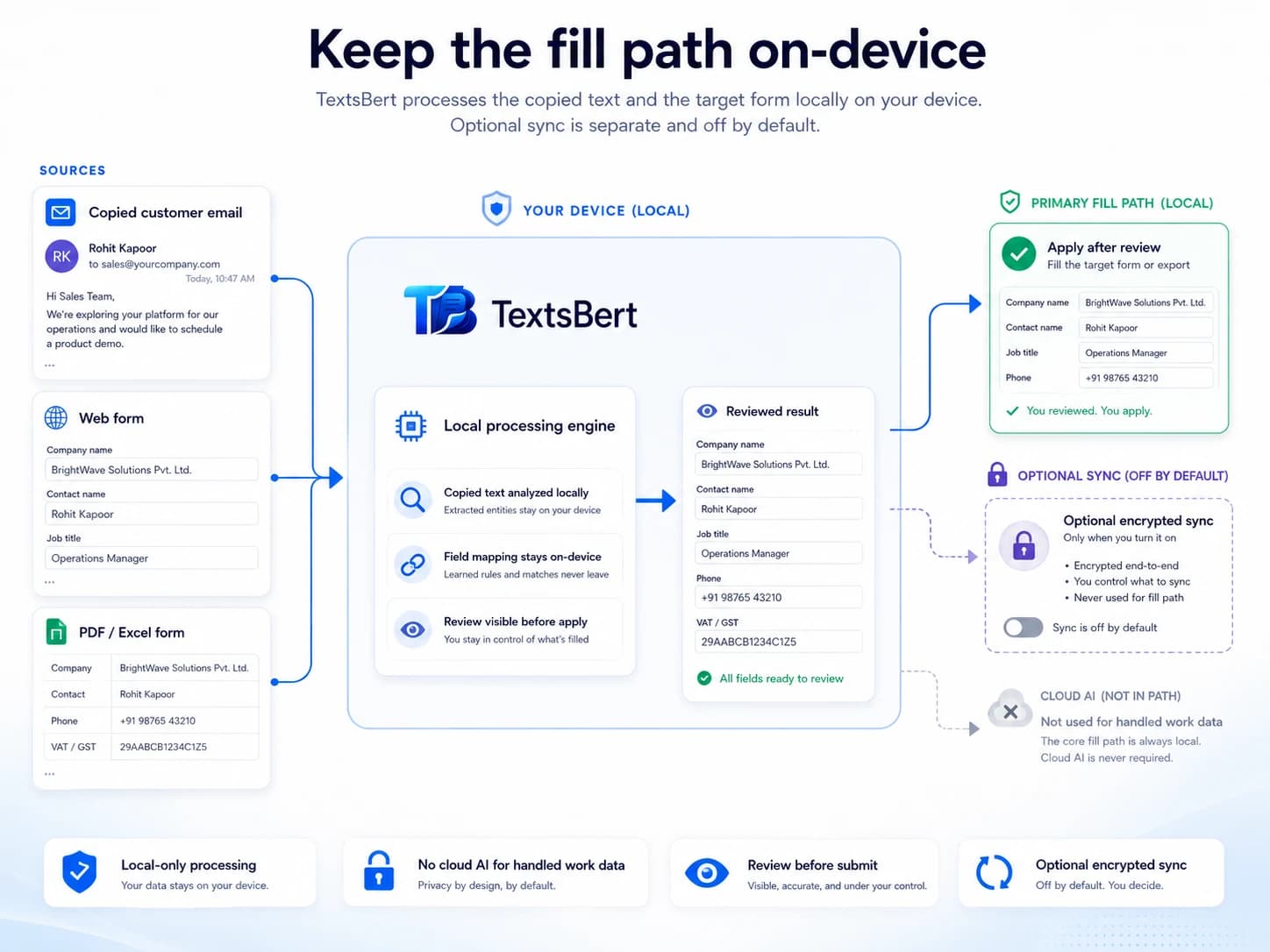
What stays local
Copied source text, visible form content, saved profiles, snippets, browser form filling data, and PDF Auto Fill source data are processed on your device during the fill path.
What uses internet
Account access, billing, subscription status, consent-based website measurement, support, and optional encrypted Sync may use internet access. They are separate from the fill path.
What you control
TextsBert prepares the fill. You review before submitting. Optional Sync is off by default and requires intentional consent.
What does local processing mean for form filling?
For TextsBert, local processing means the decision about which copied detail or saved value belongs in which visible field happens on your own device. The extension does not send copied emails, visible forms, saved details, or filled values to cloud AI to decide the fill.
- ✓The clipboard is used when you choose to trigger fill.
- ✓The form is inspected in the browser so TextsBert can understand the visible fields.
- ✓The prepared fill is shown for review.
- ✓Submitting remains your manual action.
The fill path is local. cloud AI is not part of it.
Why does an extension with local processing still need website access?
Because forms live inside websites. TextsBert needs browser permission to inspect visible labels, placeholders, field names, and nearby text. Without enough site access, the extension may not be able to see the form you want it to help with.
Access is not upload
Website access lets the extension work inside the page. It does not mean TextsBert sends the form to cloud AI.
The browser is the workplace
Browser forms are not separate documents. They are part of pages, and the extension needs page access to assist.
Review remains visible
TextsBert prepares the fill, but the user still checks and submits manually.
Local saved details for stable fields
Smart Auto Fill is the fully free layer for saved details and repetitive information: identity, address, business data, snippets, and recurring field values. When Sync is off, those details stay local on the device.
- ✓Smart Auto Fill is fully free.
- ✓Profiles and snippets help with repetitive information, saved replies, and repeated fields.
- ✓The user chooses what to save and reuse.
- ✓The form is reviewed before submission.
Copied text is used when you choose to use it
Magical Auto Fill works from text you copy and choose to use. TextsBert does not keep reading your clipboard all day. The clipboard is read when you trigger fill, so the copied email, message, or block of details can be matched to the form locally.
- ✓Clipboard use is tied to the fill action.
- ✓No cloud AI is used for the fill step.
- ✓Clearer source details give better reviewed form fills.
- ✓Review remains important when copied text is messy or mixed-language.
PDF workflows follow the same principle
When TextsBert helps with PDF Auto Fill inside the extension, the same privacy expectation applies: the source data used for the fill path is handled locally. The user reviews the result before export.
Sync is optional, encrypted, and off by default
Sync is a PRO feature for users who intentionally turn it on. It is designed for encrypted synchronization of supported TextsBert data across devices. If Sync is off, the local data remains local.
- ✓Sync requires an account and consent.
- ✓Sync can be turned off.
- ✓Data is decrypted locally through the account password.
- ✓Sync is separate from cloud AI. It is not used to decide fills.
Related privacy-first workflows
Follow the local-processing idea into real form work.
These pages connect the privacy architecture to copied-text workflows, visible review, and sensitive business data.
No-cloud form filling
See why the actual fill path stays on the device instead of relying on cloud AI.
Privacy-first browser form filling
Understand how local filling, review, and optional Sync fit together.
Before pasting business data into AI tools
Use the guide for invoices, customer emails, HR notes, and other sensitive text.
Customer emails to forms
Apply the local fill path to the messages that usually start real admin work.
Invoice data entry
Move invoice details into forms and PDFs without turning review into a blind step.
Use private form filling without giving your fill data to cloud AI.
TextsBert is built for the boring but sensitive work of real form filling: customer emails, addresses, invoices, bookings, service notes, PDF Auto Fill, and admin fields. Keep the fill path local and the final review in your hands.