


TextsBert is Featured on the Chrome Web Store.
What TextsBert covers once form filling gets real.
TextsBert brings saved details, copied-text form filling, text expansion, local-only processing, and supporting workflow pieces into one product without turning the site into a parts catalog.


What each part of the product is there to do.
The strongest part of TextsBert is that the form filling pieces fit together without becoming messy.
Smart Auto Fill
The saved-details lane for repetitive information and people who want something better than native browser autofill.
- Free and unlimited
- Better saved detail control, site rules, and exact URL rules
- Works with local file pages and the hosted import page
Magical Auto Fill
The advanced lane for copied text that changes from case to case.
- Built for emails, portals, notes, invoices, and messy input
- Magical Key gives fast clipboard access
- Review stays visible before the final action
Profiles
The saved-details layer for people, companies, billing details, and repetitive information.
- Useful across browser forms, portals, and PDFs
- Makes repeat work lighter
- Works with both fill lanes
Snippets and text expansion
The supporting layer for text expansion, saved replies, repeated form text, approved wording, and better field behavior over time.
- Snippets keep saved replies and reusable text templates ready
- Teach helps TextsBert get sharper
- Useful when a form needs repeated wording, notes, or awkward field handling
Encrypted Sync
The optional continuity layer for backup, restore, and keeping saved data together across devices.
- Included with PRO
- Ciphertext only on the backend
- Smart Auto Fill imports stay local to the extension
PDF Auto Fill
The continuation layer when the same job moves from the browser into a fillable PDF.
- Free includes one successful PDF Auto Fill export per day
- PRO opens full PDF Auto Fill
- Focused on fillable PDFs only
Excel Auto Fill
The spreadsheet continuation layer when the same changing data has to land in Excel.
- Built for Excel workbooks that repeat but still need review
- PRO opens unlimited Excel Auto Fill
- Fits the same copied-text and saved-data workflow
One product rhythm, not a pile of separate tools.
Saved autofill, changing copied text, reusable context, saved labels, and optional Sync all stay inside one product rhythm.
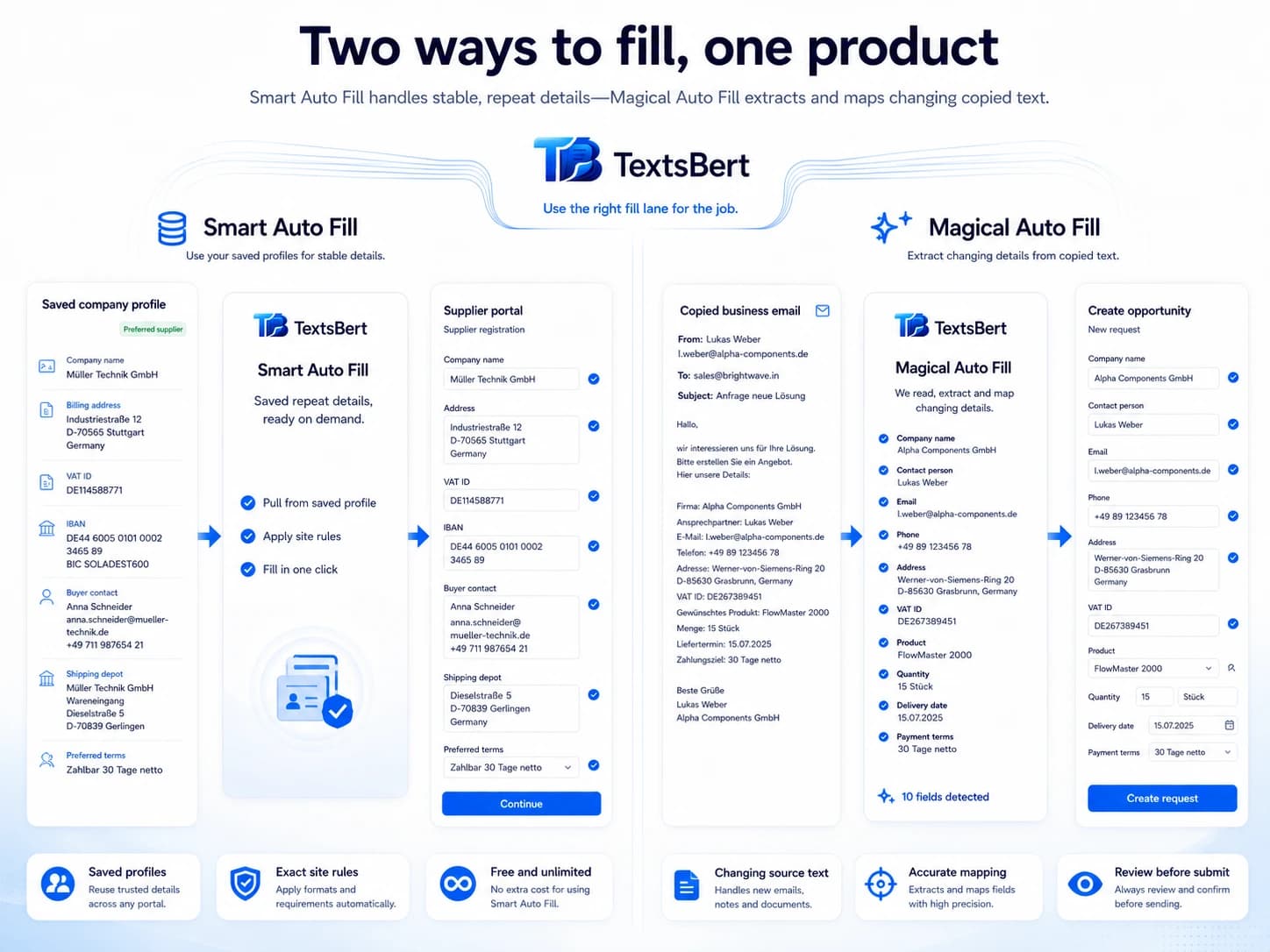
Smart Auto Fill and Magical Auto Fill live side by side.
One product for saved data and changing data instead of forcing everything through the same flow.
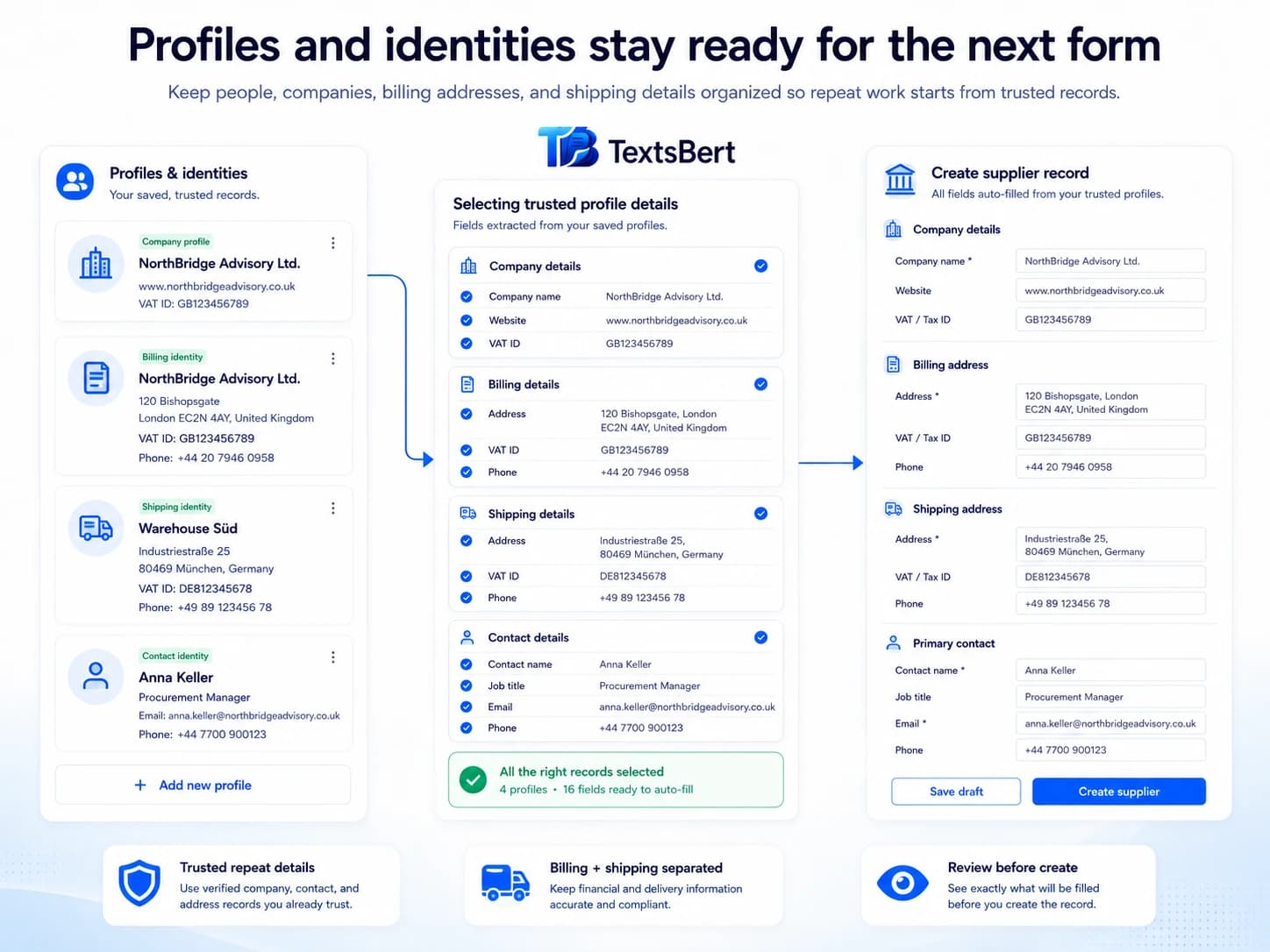
Profiles keep repeat identities ready.
Business context stays close to the next task instead of disappearing into scattered notes and old forms.
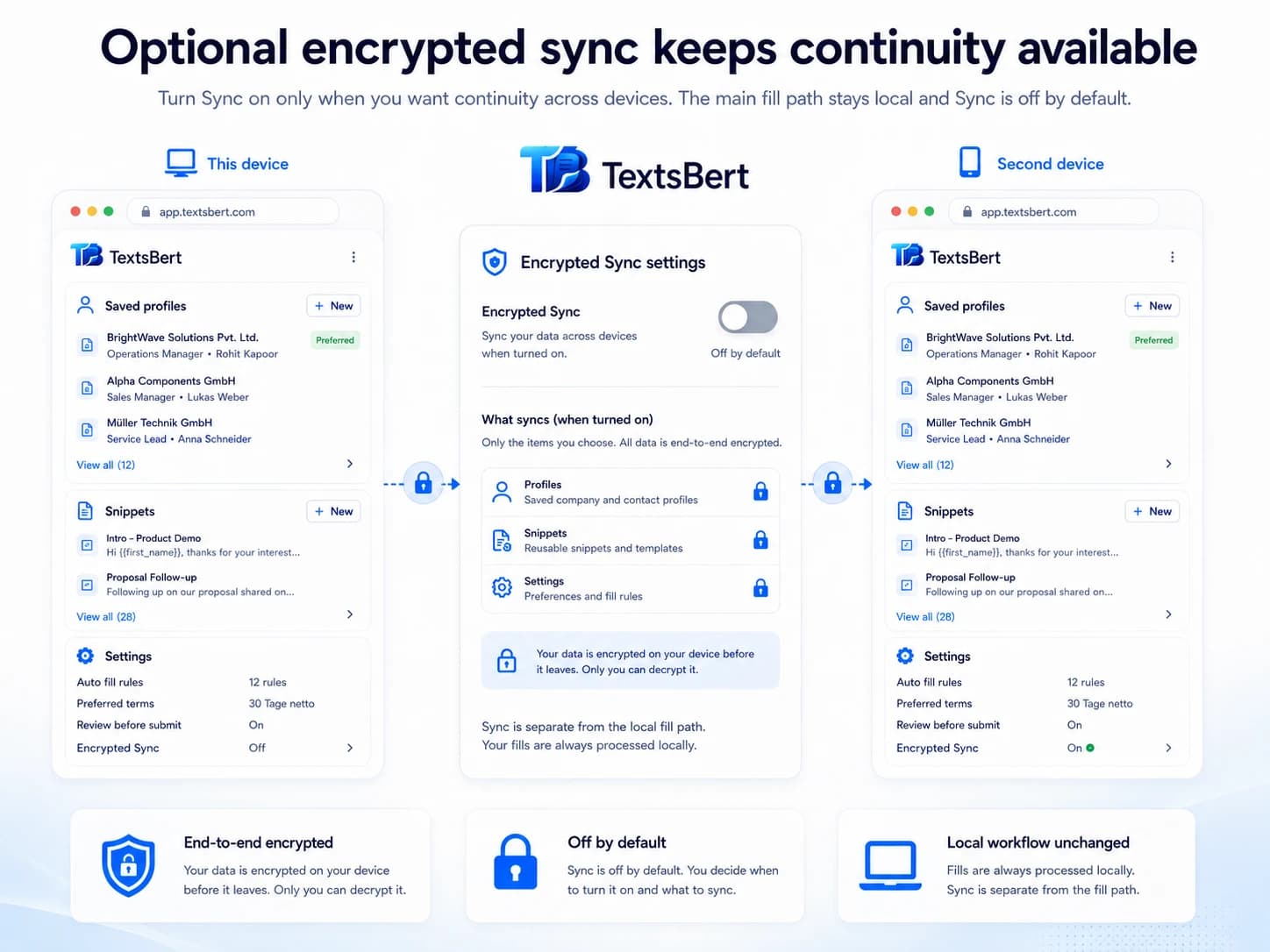
Saved autofill, labels, and optional continuity stay explicit.
Manage records, website scope, and saved labels locally, then turn on Sync only if continuity across devices is worth it.
The deeper pages are still here. They just need the right front door.
Start from the clearest overview, then open the exact part of TextsBert that matches the next real question.
Smart Auto Fill for saved details and repetitive information.
Smart Auto Fill is the free saved-details lane in TextsBert for repetitive browser form filling.
Magical Auto Fill
Magical Auto Fill helps fill forms from copied text, emails, messages, notes, invoices, and messy business details with review before submit.
Profiles keep repetitive information ready for form filling.
Profiles are the saved-details layer in TextsBert for repetitive information across browser forms and fillable documents.
Text expansion for saved replies, repeated messages, and form text.
Snippets are the text expansion layer in TextsBert for repeated writing inside browser form filling and document workflows.
Smart Field Matching
Smart Field Matching helps TextsBert connect copied details to the right browser form fields using labels, context, saved behavior, and user review.
Email Details Extraction
TextsBert helps extract useful details from copied business emails and prepare them for reviewed browser form filling.
Billing and Delivery Detection
TextsBert helps keep billing addresses, delivery addresses, service sites, warehouse locations, and contacts separated during reviewed form filling.
Multilingual Form Filling
TextsBert helps with multilingual form filling when source text, business wording, and browser forms mix languages in daily work.
Sensitive Data Form Filling
TextsBert supports privacy-conscious form filling for customer data, order details, internal notes, supplier information, and sensitive workflows.
Source-Aware Form Filling
TextsBert helps fill browser forms from the right source: copied text, selected page information, saved profiles, snippets, and learned field behavior.
Learned field behavior keeps unusual fields reusable.
Learned field behavior is the reusable memory layer for stubborn portals, awkward fields, and repeated edge cases.
Teach a Meaning helps TextsBert understand what a field really means.
Teach a Meaning stores semantic help for fields that need extra guidance.
Teach a Pattern helps repeated site behavior stay reusable.
Teach a Pattern stores broader repeated behavior beyond one field or one page.
Correct This Fill turns a near miss into a better next run.
Correct This Fill is the practical correction loop for repeated browser work.
Review Learned Items keeps remembered behavior visible and maintainable.
Review Learned Items is the maintenance view for what TextsBert has learned over time.
Final control keeps the last action with the user.
Final control is the product rule that speed should not erase user review.
Encrypted Sync keeps the setup together without taking over the workflow.
Encrypted Sync is the continuity layer around the TextsBert browser workflow.
On-page fill buttons start work from the page you are already on.
The on-page fill buttons are the fast entry point for page-based workflow entry.
Backup, export, and import keep reusable setup portable and recoverable.
Backup, export, and import give TextsBert a practical continuity layer without weakening the privacy-first product story.
Fill from clipboard is the fastest way to start real browser work.
Clipboard filling is the most direct daily browser workflow in TextsBert.
Selected page info helps when the page already contains useful context.
Selected page info keeps TextsBert close to the page you are already working in.
Preview Fill shows the result before the final action.
Preview Fill is the confidence check between source text and the final form action.
Disable on this site keeps one portal out of the workflow.
Disable on this site is the clean stop switch for one portal, not your whole setup.
Disable a specific field when one field should be left alone.
This is the narrow control for one awkward or sensitive field without disabling the whole site.
Use profiles when the same identity keeps coming back.
Profiles move repeated identities out of memory and into a reusable layer.
Vendor onboarding gets lighter when the company record is already ready.
Vendor onboarding is one of the clearest fits for Smart Auto Fill, profiles, snippets, and the field memory that builds up across repeated portals.
Shipping and billing forms are exactly where TextsBert feels at home.
Shipping and billing work shows why Smart Auto Fill and Magical Auto Fill belong in the same product.
Admin portals feel less stubborn once repeated behavior starts carrying forward.
Admin portals are a strong fit for on-page entry, learned field behavior, and a workflow that gets sharper with repetition.
TextsBert stays useful because the rules stay clear.
Review stays visible, Sync stays optional, and the line between Free and PRO stays easy to understand.
- Smart Auto Fill starts off by default.
- Final submit stays with the user.
- Sync stays optional and encrypted.
- PDF remains a supporting depth layer, not the whole brand.
In many countries, copied customer data should not leave the workflow just to be processed by outside cloud AI. TextsBert keeps the core workflow on the user's own machine.
Sources:European CommissionEDPB Guidelines 05/2021ICO international transfers