


Robotic Process Automation (RPA) is defined as software technology that uses bots to automate repetitive, rule-based digital tasks by mimicking human interactions with computer systems. The business case is urgent: employees spend about 33% of their working hours on routine administration, and 64% face burnout monthly as a result. RPA addresses that drain directly. Rather than replacing back-end systems or requiring deep IT integration, RPA bots work at the user interface layer, doing exactly what a human employee would do, only faster and without errors. For any decision-maker evaluating where automation fits in their organization, understanding what RPA is and what it is not is the right starting point.
What is RPA and how does it differ from traditional automation?
RPA is software that controls a computer the way a person would. It clicks buttons, fills in fields, copies data between applications, and follows a defined sequence of steps. The key distinction from traditional automation is that RPA operates at the GUI layer, meaning it interacts with the visible interface of any application rather than connecting through back-end APIs or database calls.

Traditional automation requires developers to build integrations between systems at the code level. That takes months and often demands significant IT resources. RPA skips that entirely. A bot can be configured to work with any application a human can open on screen, from a legacy claims system to a modern CRM.
The term “robotic” is worth clarifying. No physical robot is involved. The “robot” is a software process running on a server or desktop, executing tasks according to a script. The industry term Robotic Process Automation, often abbreviated as RPA, is the recognized standard across organizations including SAP, Oracle, and Google Cloud.
How does RPA technology work in practice?
RPA bots follow a defined workflow, executing each step in sequence without deviation. The process typically starts with workflow recording, where a developer or analyst records the steps a human takes to complete a task. That recording generates a script the bot follows on every subsequent run.
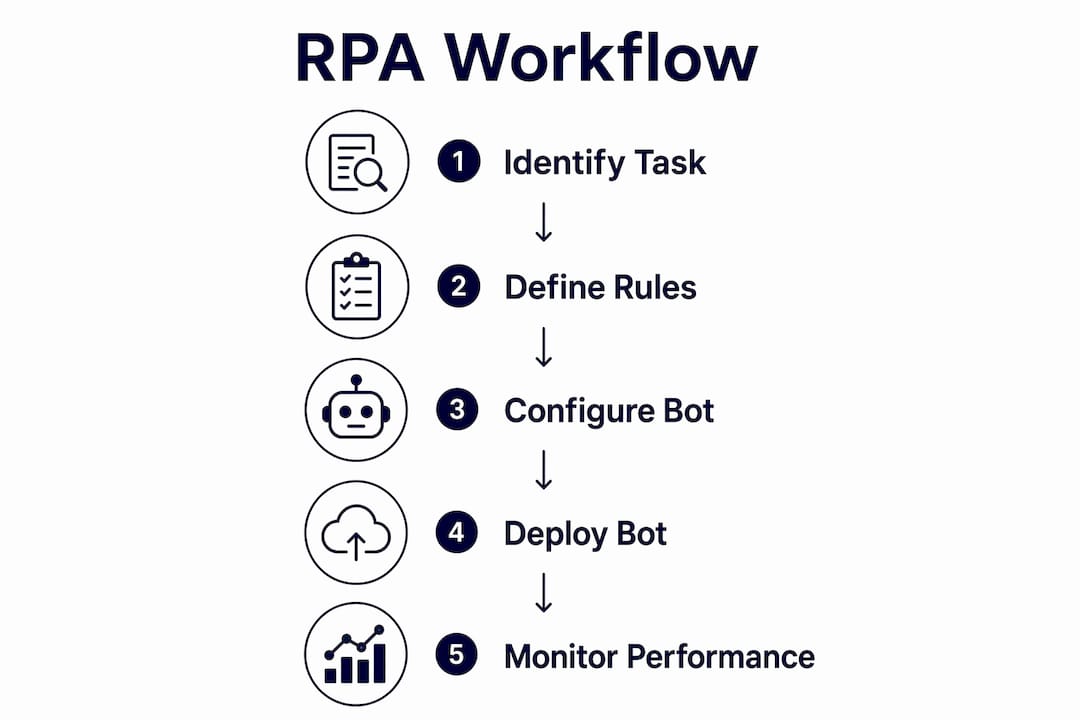
Workflow recording is a useful starting point, but it rarely produces a production-ready bot on its own. Developers must add manual scripting to handle exceptions, loops, and edge cases that a simple recording misses. A bot that processes invoices, for example, needs logic to handle missing fields, duplicate entries, or unexpected pop-up dialogs.
RPA bots interact with applications through several methods:
- Screen scraping: Reading text and data directly from the visible screen
- UI element recognition: Identifying buttons, fields, and menus by their properties
- Keyboard and mouse simulation: Typing text and clicking controls exactly as a human would
- Clipboard operations: Copying and pasting data between applications
- File and folder management: Moving, renaming, or reading files as part of a workflow
Each of these methods works without modifying the underlying application. That is what makes RPA deployable across systems that would otherwise require expensive custom integrations.
Pro Tip: Build bot governance into your RPA program from day one. Assign a team member to monitor bot performance weekly and review logs for failure patterns. Bots that run unmonitored tend to fail silently when application interfaces change.
What are the key differences between RPA and AI?
RPA and AI are not the same technology, and conflating them is one of the most common mistakes decision-makers make. RPA is rule-based execution automation, while AI focuses on cognitive, data-driven decision-making. Each plays a distinct role.
Think of it this way: RPA is the hands, and AI is the brain. RPA executes a predefined sequence of steps with precision. AI reads unstructured data, identifies patterns, and makes judgment calls. A well-designed automation program uses both layers together.
| Dimension | RPA | AI |
|---|---|---|
| Input type | Structured, predictable data | Unstructured or variable data |
| Decision-making | Follows fixed rules | Learns from data and adapts |
| Typical task | Data entry, form filling, report generation | Sentiment analysis, document classification, forecasting |
| Setup requirement | Workflow design and scripting | Model training and data preparation |
| Failure mode | Breaks when UI or rules change | Degrades when training data is outdated |
RPA and AI are complementary technology layers. A common real-world example: an AI model reads and classifies incoming vendor invoices, then hands the structured output to an RPA bot that enters the data into an accounting system. Neither technology alone covers the full workflow.
Pro Tip: If your process involves reading handwritten documents, interpreting email intent, or making judgment calls, you need AI in the loop. If your process is a fixed sequence of clicks and data transfers, RPA alone is sufficient.
What benefits can businesses expect from implementing RPA?
The most immediate benefit of RPA is speed. A bot completes a data entry task in seconds that takes a human several minutes. Across hundreds of daily transactions, that difference compounds into hours of recovered capacity every week.
RPA frees employees from mundane work, improving engagement and allowing teams to focus on work that requires judgment, creativity, and client interaction. That shift matters for retention. When skilled professionals spend their days copying data between systems, they disengage. Removing that friction changes the nature of their role.
The operational benefits extend across several dimensions:
- Accuracy: Bots do not make transcription errors. Every field is filled exactly as specified.
- Compliance: Bots follow the same process every time, creating a consistent audit trail.
- Speed of deployment: RPA deploys faster than traditional integration because it requires no back-end system changes.
- Cost reduction: Fewer manual hours on repetitive tasks translates directly to lower processing costs.
- Scalability: A bot can run 24 hours a day, seven days a week, without overtime or scheduling constraints.
Common RPA use cases in business include invoice processing, employee onboarding data entry, inventory updates, customer data transfers to CRM systems, and compliance reporting. Each of these involves structured, repeatable steps that a bot handles reliably. For teams managing back-office admin workflows, the time savings are measurable from the first week of deployment.
What challenges and best practices come with RPA deployment?
RPA delivers real gains, but only when deployed against the right processes. The most common mistake is automating a broken process. Automating a poorly designed process produces faster failures, not better outcomes. Process mining and simplification must come before automation.
A structured deployment approach reduces risk significantly. The steps below reflect what successful RPA programs have in common:
- Map the process first. Document every step, decision point, and exception before writing a single line of bot script. Gaps in the map become bot failures in production.
- Simplify before automating. Remove unnecessary steps, consolidate redundant approvals, and fix data quality issues. Automating messy workflows only locks in the inefficiency.
- Start with a pilot. Choose one high-volume, low-complexity process for the first bot. Prove the value, then expand.
- Plan for maintenance. Bots require ongoing upkeep when application UIs change. A button that moves or a field that renames will break a bot that was working perfectly the day before.
- Establish bot governance. Assign ownership for each bot. Define who monitors logs, who approves changes, and who handles failures. Bots without owners fail quietly and stay broken.
The governance piece is where most RPA programs underinvest. Organizations that treat bots as “set and forget” tools consistently report higher failure rates and lower ROI than those that build ongoing monitoring into their operating model. For teams exploring how AI fits alongside these practices, resources like Interval AI offer useful context on combining automation layers effectively.
Pro Tip: Schedule a quarterly bot audit. Review each bot’s error logs, check whether the underlying process has changed, and confirm the bot still reflects current business rules. Thirty minutes per bot per quarter prevents hours of troubleshooting later.
Key Takeaways
RPA delivers measurable efficiency gains when deployed against well-defined, rule-based processes with proper governance in place.
| Point | Details |
|---|---|
| RPA definition | RPA automates repetitive, rule-based tasks by mimicking human actions at the user interface level. |
| RPA vs. AI | RPA executes fixed rules; AI handles decisions and unstructured data. Use both together for complex workflows. |
| Deployment speed | RPA deploys faster than traditional integration because it requires no back-end system changes. |
| Process quality first | Automating a broken process produces faster failures. Simplify and map processes before building bots. |
| Bot governance | Assign ownership, monitor logs, and audit bots quarterly to prevent silent failures as UIs evolve. |
Why RPA is worth taking seriously, even if you start small
I have watched organizations spend months debating whether RPA is “the right fit” while their teams manually copy data between systems eight hours a day. The debate itself costs more than a pilot would.
The honest reality is that RPA is not a transformation program. It is a targeted tool. The organizations that get the most from it are the ones that pick one painful, high-volume process, automate it well, and measure the result. That proof of concept does more to build internal confidence than any vendor presentation.
What I find underappreciated is the human dimension. When you remove the data entry grind from a skilled analyst’s day, their output quality improves noticeably. The productivity gains from automation are real, but the engagement gains are what sustain the program long-term. People stop resisting automation when they see it removing the work they disliked most.
The caution I always offer: do not skip governance. The organizations that treat RPA as a one-time project, rather than an ongoing operational responsibility, end up with a graveyard of broken bots that nobody owns. Start small, monitor closely, and expand only when the foundation is solid.
— Moe.
Textsbert handles the repetitive form work your team shouldn’t be doing
Professionals who understand RPA quickly recognize that form filling is one of the highest-frequency, lowest-value tasks in any office workflow. Textsbert is built specifically for that problem.

The Textsbert browser extension autofills web forms, fillable PDFs, and Excel sheets using saved business details and copied text. Data is processed locally on your device, so sensitive information never leaves your control. The Smart Auto Fill and Magical Auto Fill features let you review every entry before submission, giving you speed without sacrificing accuracy. For teams spending hours on vendor onboarding, billing, or CRM data entry, Textsbert’s autofill solution removes the manual work without requiring any IT integration.
FAQ
What is RPA in simple terms?
RPA stands for Robotic Process Automation. It is software that automates repetitive, rule-based computer tasks by mimicking the clicks, typing, and data transfers a human would perform.
How does RPA differ from AI?
RPA follows fixed, predefined rules to execute tasks. AI learns from data and makes decisions. The two technologies work best together, with AI handling judgment and RPA handling execution.
What tasks are best suited for RPA?
RPA works best on structured, high-volume, rule-based tasks such as invoice processing, data entry, report generation, and form filling. Tasks requiring interpretation or judgment need AI involvement.
Does RPA require changes to existing software systems?
No. RPA operates at the user interface level, meaning it interacts with applications the same way a human does. No back-end changes or API integrations are required.
What is the biggest risk in RPA deployment?
The biggest risk is automating a poorly designed process. Bots also require ongoing maintenance because changes to application interfaces can break workflows that previously ran without issues.